RS232 serial cables pinout




- RS232 serial connector pin assignment
- RS232 DB9 to DB25 converter
- RS232 serial loopback test plugs
- RS232 null modem cables
- Spy / monitor cable
- Serial printer cables
- Yost RS232 on RJ45 standard
RS232 serial cable layout
Almost nothing in computer interfacing is more confusing than selecting the right RS232 serial cable. These pages are intended to provide information about the most common serial RS232 cables in normal computer use, or in more common language “How do I connect devices and computers using RS232?”
RS232 serial connector pin assignment
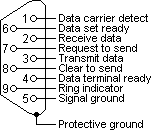
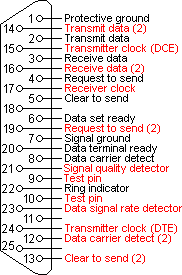
The RS232 connector was originally developed to use 25 pins. In this DB25 connector pinout provisions were made for a secondary serial RS232 communication channel. In practice, only one serial communication channel with accompanying handshaking is present. Only very few computers have been manufactured where both serial RS232 channels are implemented. Examples of this are the Sun SparcStation 10 and 20 models and the Dec Alpha Multia. Also on a number of Telebit modem models the secondary channel is present. It can be used to query the modem status while the modem is on-line and busy communicating. On personal computers, the smaller DB9 version is more commonly used today. The diagrams show the signals common to both connector types in black. The defined pins only present on the larger connector are shown in red. Note, that the protective ground is assigned to a pin at the large connector where the connector outside is used for that purpose with the DB9 connector version.
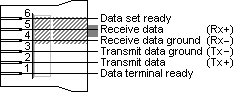
The pinout is also shown for the DEC modified modular jack. This type of connector has been used on systems built by Digital Equipment Corporation; in the early days one of the leaders in the mainframe world. Although this serial interface is differential (the receive and transmit have their own floating ground level which is not the case with regular RS232) it is possible to connect RS232 compatible devices with this interface because the voltage levels of the bit streams are in the same range. Where the definition of RS232 focused on the connection of DTE, data terminal equipment (computers, printers, etc.) with DCE, data communication equipment (modems), MMJ was primarily defined for the connection of two DTE’s directly.
RS232 DB25 to DB9 converter
The original pinout for RS232 was developed for a 25 pins sub D connector. Since the introduction of the smaller serial port on the IBM-AT, 9 pins RS232 connectors are commonly used. In mixed applications, a 9 to 25 pins converter can be used to connect connectors of different sizes. As most of the computers are equipped with the DB9 serial port version, all wiring examples on this website will use that connector as a default. If you want to use the example with a DB25, simply replace the pin numbers of the connector according to the conversion table below.
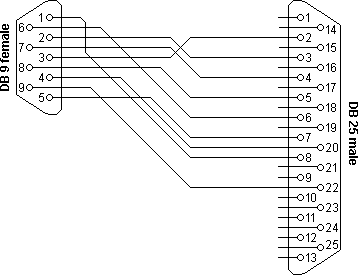
| DB9 | DB25 | Name | Function |
|---|---|---|---|
| 1 | 8 | DCD | Data carrier detect |
| 2 | 3 | Rx | Receive data |
| 3 | 2 | Tx | Transmit data |
| 4 | 20 | DTR | Data terminal ready |
| 5 | 7 | GND | Signal ground |
| 6 | 6 | DSR | Data set ready |
| 7 | 4 | RTS | Request to send |
| 8 | 5 | CTS | Clear to send |
| 9 | 22 | RI | Ring indicator |
RS232 serial loop-back test plugs
The following RS232 connectors can be used to test a serial port on your computer. The data and handshake lines have been linked. In this way all data will be sent back immediately. The PC controls its own handshaking. The first test plug can be used to check the function of the RS232 serial port with standard terminal software. The second version can be used to test the full functionality of the RS232 serial port with Norton Diagnostics or CheckIt.
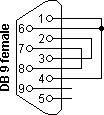
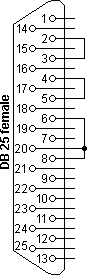
| DB9 | DB25 | Function |
|---|---|---|
| 1 + 4 + 6 | 6 + 8 + 20 | DTR ► CD + DSR |
| 2 + 3 | 2 + 3 | Tx ► Rx |
| 7 + 8 | 4 + 5 | RTS ► CTS |
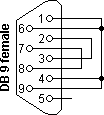
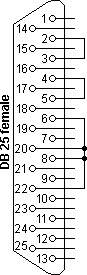
| DB9 | DB25 | Function |
|---|---|---|
| 1 + 4 + 6 + 9 | 6 + 8 + 20 + 22 | DTR ► CD + DSR + RI |
| 2 + 3 | 2 + 3 | Tx ► Rx |
| 7 + 8 | 4 + 5 | RTS ► CTS |
Testing occurs in a few steps. Data is sent on the Tx line and the received information on the Rx input is then compared with the original data.
The signal level on the DTR and RTS lines is also controlled by the test software and the attached inputs are read back in the software to see if these signal levels are properly returned. The second RS232 test plug has the advantage that the ring-indicator RI input line can also be tested. This input is used by modems to signal an incoming call to the attached computer.
RS232 null modem cables
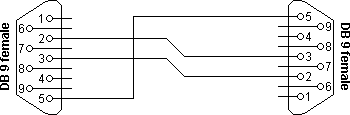
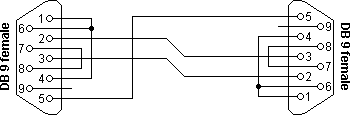
The easiest way to connect two PC’s is using an RS232 null modem cable. The only problem is the large variety of RS232 null modem cables available. For simple connections, a three line RS232 cable connecting the signal ground and receive and transmit lines is sufficient. Depending of the software used, some sort of handshaking may however be necessary. Use the RS232 null modem selection table to find the right null modem cable for each purpose. For a Windows 95/98/ME Direct Cable Connection, the RS232 null modem cable with loop back handshaking is a good choice.
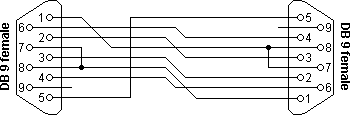
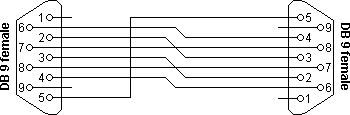
RS232 null modem cables with handshaking can be defined in numerous ways, with loop-back handshaking to each PC, or complete handshaking between the two systems. The most common null modem cable types are shown here.
(explanation)
| Connector 1 | Connector 2 | Function |
|---|---|---|
| 2 | 3 | Rx ◄ Tx |
| 3 | 2 | Tx ► Rx |
| 5 | 5 | Signal ground |
(explanation)
| Connector 1 | Connector 2 | Function |
|---|---|---|
| 2 | 3 | Rx ◄ Tx |
| 3 | 2 | Tx ► Rx |
| 5 | 5 | Signal ground |
| 1 + 4 + 6 | – | DTR ► CD + DSR |
| – | 1 + 4 + 6 | DTR ► CD + DSR |
| 7 + 8 | – | RTS ► CTS |
| – | 7 + 8 | RTS ► CTS |
(explanation)
| Connector 1 | Connector 2 | Function |
|---|---|---|
| 1 | 7 + 8 | RTS2 ► CTS2 + CD1 |
| 2 | 3 | Rx ◄ Tx |
| 3 | 2 | Tx ► Rx |
| 4 | 6 | DTR ► DSR |
| 5 | 5 | Signal ground |
| 6 | 4 | DSR ◄ DTR |
| 7 + 8 | 1 | RTS1 ► CTS1 + CD2 |
(explanation)
| Connector 1 | Connector 2 | Function |
|---|---|---|
| 2 | 3 | Rx ◄ Tx |
| 3 | 2 | Tx ► Rx |
| 4 | 6 | DTR ► DSR |
| 5 | 5 | Signal ground |
| 6 | 4 | DSR ◄ DTR |
| 7 | 8 | RTS ► CTS |
| 8 | 7 | CTS ◄ RTS |
|
If you don't care where you are, you ain't lost.
RUNE'S RULE
|